
DNS over TLS and HTTPS (DoT and DoH)
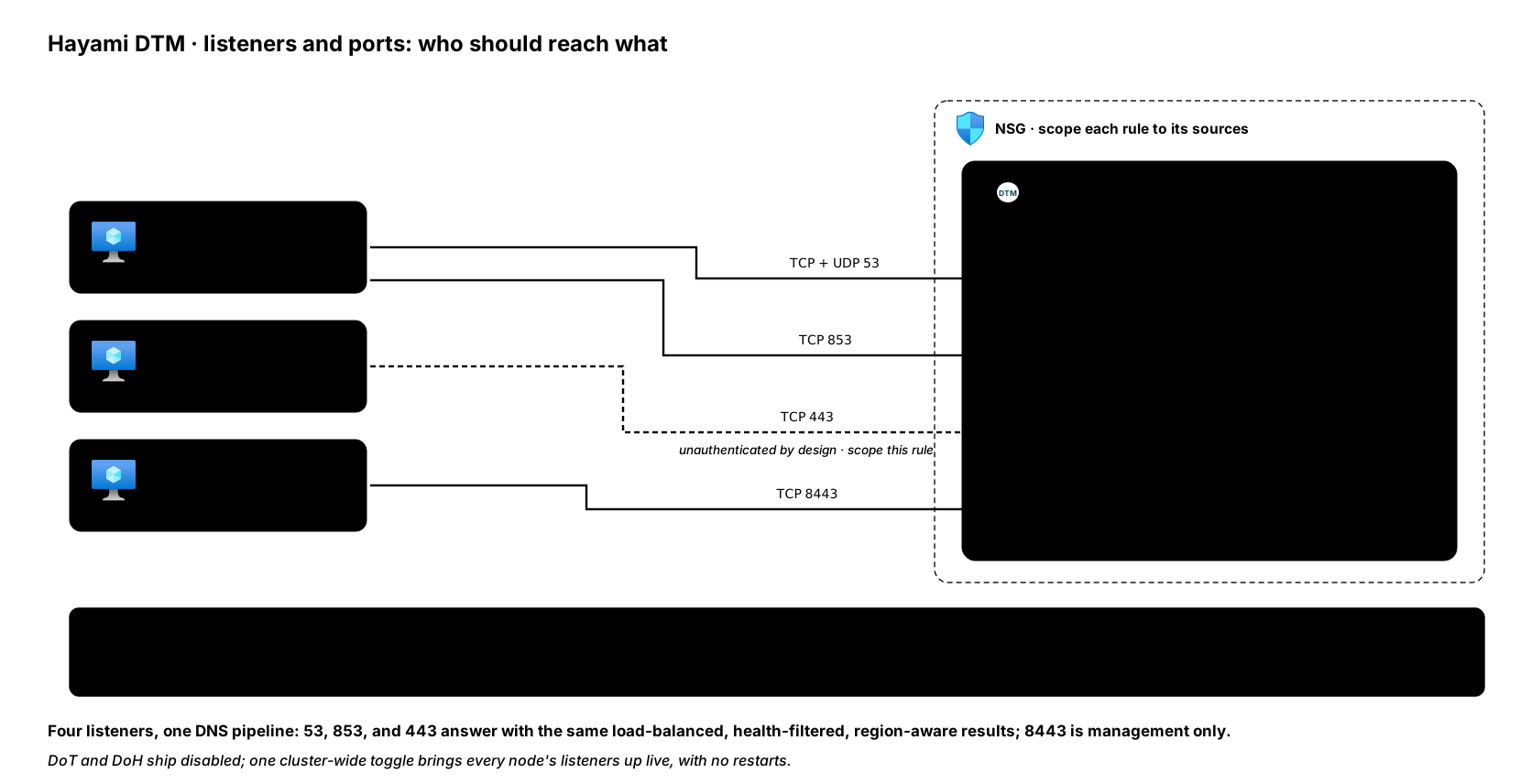
DTM can answer DNS over two encrypted transports alongside plain port 53:
DNS-over-TLS (DoT, RFC 7858, its own TCP port 853) and DNS-over-HTTPS
(DoH, RFC 8484, its own dedicated listener on port 443 serving
GET/POST /dns-query and nothing else). Both ship disabled and turn on
with one cluster-wide toggle. Answers over either transport go through exactly
the same pipeline as UDP: load balancing,
health filtering, and
region-aware logic all apply.
Before you enable
Section titled “Before you enable”- Give the API a stable certificate first. Both transports serve the API
listener’s TLS material: DoT wraps the DNS handler in it on port
853, and the DoH listener serves the same certificate and key on port443(there is no separate DoH certificate). By default that material is each node’s own self-signed certificate, written at first boot, which encrypted-DNS clients will refuse because no CA vouches for it. Upload one CA-issued certificate for the whole cluster (the TLS certificates page has the procedure, and no restart is needed) before rolling either transport out to clients. What strict and opportunistic clients each do with a self-signed certificate, and how to make your own if you have no CA, is in client trust. - Open the encrypted-DNS ports deliberately. Allow TCP
853(DoT) and TCP443(DoH) from your DNS clients to the DTM nodes in the NSG; both are in the deploy port table. - Treat DoH as a security decision, not a feature toggle.
Turn them on
Section titled “Turn them on”The runtime toggle is the primary surface. In the web UI, Settings then
Transport Protocols shows each transport’s state with a toggle (admin
role); teams that manage cluster config as code use the
dtm_transport_config Terraform resource
instead. Over the API, with $DTM_TOKEN holding an admin bearer token
(how to capture one):
curl -sk -X PUT https://dtm.internal:8443/api/v1/transport-config \ -H "Authorization: Bearer $DTM_TOKEN" \ -H "X-DTM-CSRF: 1" \ -H "Content-Type: application/json" \ -d '{"dot_enabled": true, "doh_enabled": true}'Either way, the change applies live and replicates cluster-wide: every node brings its listeners up (or down) to match, with no restarts. Details worth knowing:
- The request body is partial: send only the fields you are changing
(
dot_enabled,dot_listen_addr,doh_enabled,doh_listen_addr). A misspelled field is a400, never a silent no-op, because this setting fans out to every node. dot_listen_addrdefaults to":853"anddoh_listen_addrto":443"; both must behost:portvalues, and an empty host means all interfaces. Changing either live moves that listener, but the two orders differ: DoT stops the old address, then starts the new one; DoH binds the new address first and releases the old one only once the bind succeeds, so an unbindabledoh_listen_addrleaves DoH serving where it was.- Disabling DoH stops its listener, so port
443closes rather than the route answering404. GET /api/v1/transport-configreturns the effective state, including who changed it last and when, and the change itself is audit-logged.- If DoT is enabled but a node cannot load its TLS material, that node logs
the error and leaves DoT down rather than serving a broken listener; check
the node’s logs if
853does not answer.
Boot defaults
Section titled “Boot defaults”The configuration file sets what the transports start as on a fresh cluster:
listen: dot: enabled: true listen_addr: ':853' doh: enabled: true listen_addr: ':443'In the Terraform customer-starter environment the node module exposes the
same as dot_enabled and doh_enabled variables. Two things follow from “boot default”:
- A config-file edit takes effect at the next service restart, like any other boot-time setting.
- Once anyone has made a runtime change (UI or API), the persisted runtime setting wins over the YAML at startup. The file is the initial state, not an override.
Verify
Section titled “Verify”With kdig (from knot-dnsutils) against any node:
# DoTkdig @<node-ip> app.example.internal +tls
# DoHkdig @<node-ip> app.example.internal +https=/dns-query
Both should return the same answers as dig @<node-ip> on port 53,
including health-filtered and region-aware results. For DoH without kdig:
POST /dns-query takes a wire-format DNS message with
Content-Type: application/dns-message and answers in kind.
Next steps
Section titled “Next steps”- Configuration reference: the
listenblock in full, including the TLS file paths. - Security: where encrypted inbound DNS sits in the overall model.
- Forwarders and stub zones: encrypting DTM’s outbound path too.