
ALIAS records (health-aware linked targets)
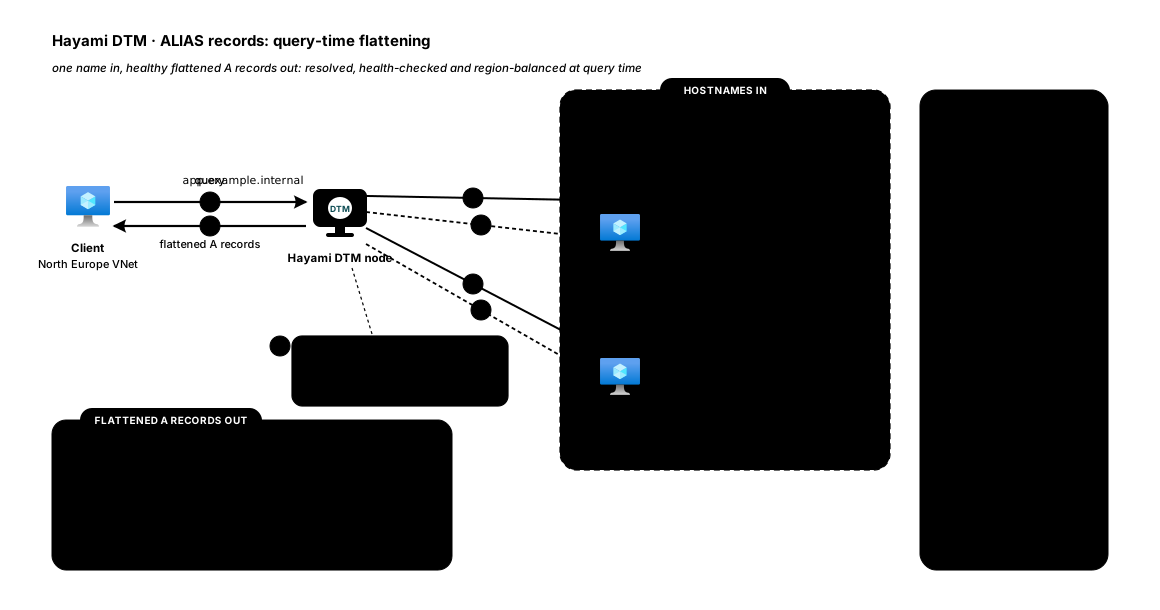
An ALIAS record points a name at one or more downstream hostnames instead
of fixed IP addresses. Hayami DTM resolves those targets for you, health-checks
the addresses behind them, picks the best healthy one for each client, and
returns the answer as ordinary A/AAAA records. When a backend’s address
changes, DTM picks it up automatically, and you never edit the record.
Unlike a CNAME, an ALIAS record:
- can sit at the zone apex (e.g.
app.contoso.comitself); - is health-checked, so unhealthy targets are dropped from the answer;
- is load-balanced and region-aware, so clients that query DTM directly are steered to healthy targets in their own region, with automatic cross-region failover (behind a single shared forwarder, only the failover applies; see known limitations);
- returns flattened
A/AAAAanswers, so the client never has to chase a second lookup.
Why it matters
Section titled “Why it matters”Load-balancing private resources across Azure regions has traditionally meant stitching together paired internal load balancers, custom DNS, and home-grown failover. An ALIAS record does it directly: point one name at your regional endpoints and Hayami DTM handles health, region affinity, and failover, all entirely inside your own VNet.
Set one up
Section titled “Set one up”You can create an ALIAS record from the web UI (Add Record → Type: ALIAS), the REST API, or the Terraform provider.
Example: cross-region, health-checked
Section titled “Example: cross-region, health-checked”This points app.corp.example at a North Europe and a West Europe endpoint,
steers each client to its own region, and fails over automatically:
curl -X POST https://<dtm>/api/v1/zones/<zone-id>/records \ -H "Authorization: Bearer <token>" \ -H "X-DTM-CSRF: 1" \ -H "Content-Type: application/json" \ -d '{ "name": "app", "type": "ALIAS", "ttl": 30, "values": [ { "value": "app-ne.contoso.com", "region": "northeurope" }, { "value": "app-we.contoso.com", "region": "westeurope" } ], "lb_policy": { "method": "region" }, "health_check_template": { "protocol": "https", "port": 443, "path": "/healthz", "interval_seconds": 5 } }'valuesare hostnames, not IPs. Theregionis optional: if you leave it blank, DTM derives it from the resolved address using your subnet mappings.lb_policyaccepts all six methods (round-robin,failover,latency,region,geo-failover,weighted). One caveat: per-value weights have no effect on an ALIAS, because weights are keyed by the record’s hostname values while load balancing runs over the resolved IPs, soweightedbehaves as an even split here; prefer the other five policies for ALIAS records. See load-balancing methods.health_check_templateis optional. With it, DTM probes every resolved address and only returns healthy ones; a5-second interval gives the fastest failover for critical services. Backends behind auth? Probes can authenticate; see authenticated health probes.
How it behaves
Section titled “How it behaves”- TTL is whatever you set on the record (
30s above), independent of the downstream’s own TTL, so clients fail over quickly. - A target whose address changes is picked up automatically on DTM’s next refresh; you don’t touch the record.
- A target that stops resolving or fails its health check is dropped from the answer, and traffic shifts to the remaining healthy targets (including across regions when a whole region is down).
- If nothing resolves, the name returns an empty answer rather than a stale or wrong one. If a target’s lookup fails transiently, DTM keeps serving its last good addresses for up to 5 minutes; after that, an empty answer. If addresses resolve but every one is failing its health check, DTM returns them all, so clients keep a route to a backend that is on its way back.
Good to know
Section titled “Good to know”- ALIAS targets must be hostnames (not IP literals); use an
A/AAAArecord if you want to pin fixed addresses. - Like
CNAME, an ALIAS record is exclusive at a name: it can’t share a name with other record types.
Need a hand? Email [email protected].