
Private Endpoint DNS automation
Azure Private Endpoints only work if clients can resolve a service’s
privatelink.* name to the endpoint’s private IP. DTM can maintain those
records for you: it enumerates the Private Endpoints your nodes can see,
reads each endpoint’s DNS configuration (the fully qualified name and its
private IPs), and keeps matching A records in the corresponding
privatelink.* zone on DTM.
The integration is opt-in and read-only. It is disabled by default, and while disabled DTM makes no ARM calls at all. When enabled it only ever reads from Azure; it never creates, modifies, or deletes Azure resources.
How it works
Section titled “How it works”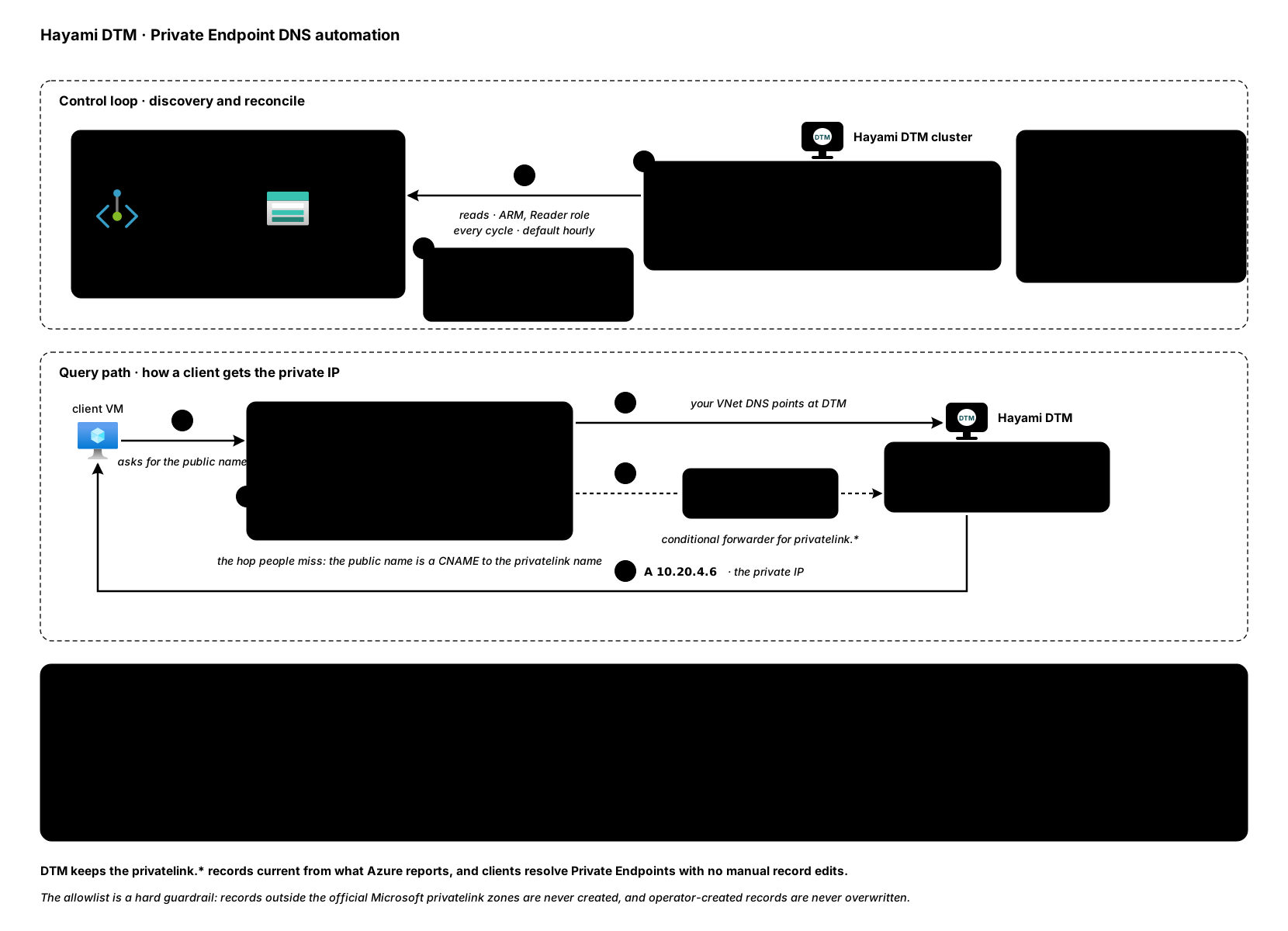
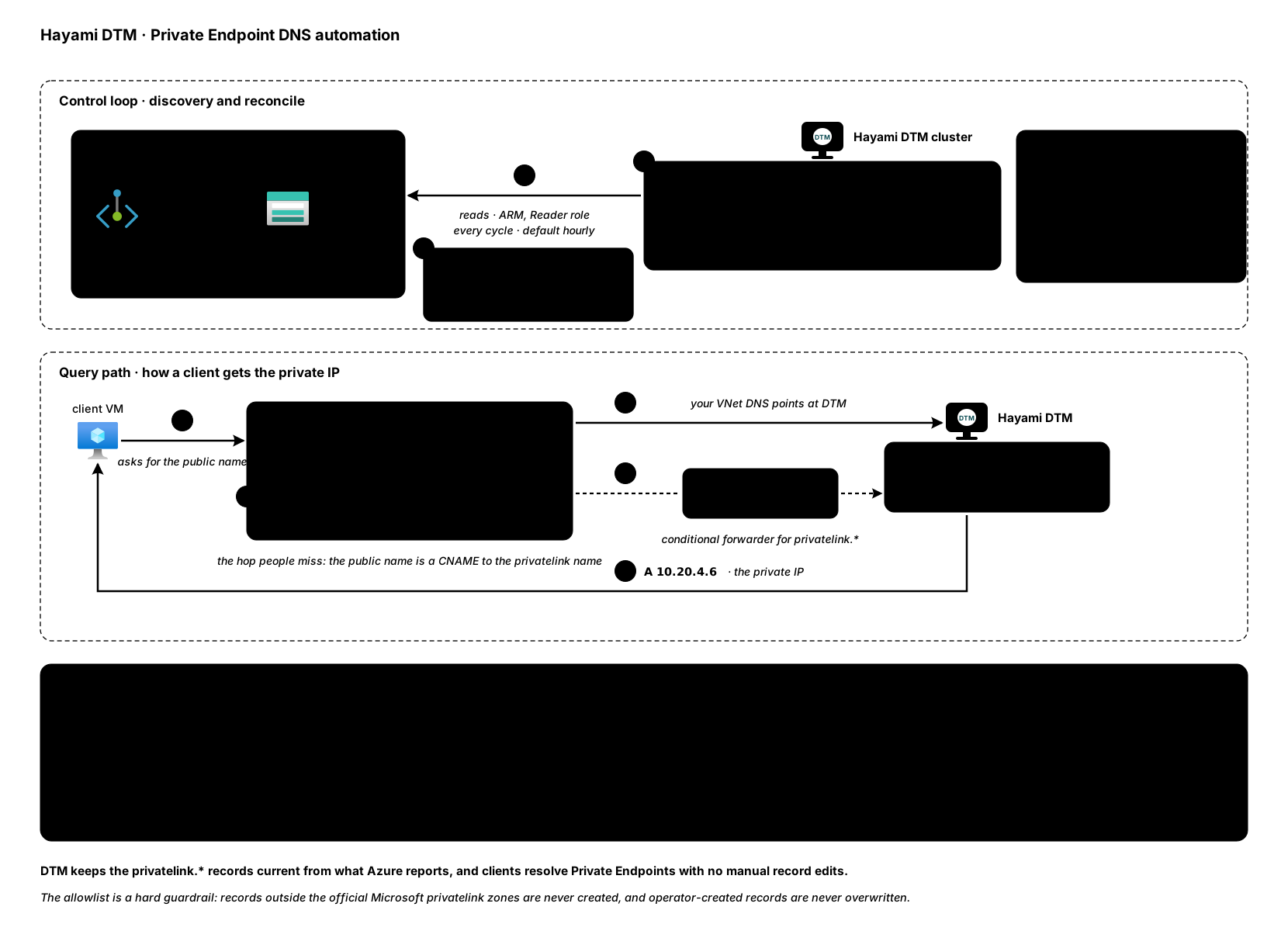
When enabled, DTM periodically walks the same discovery scopes you configured for Azure region discovery, so there is no separate scope list to maintain. For each Private Endpoint it finds, DTM:
- Reads the endpoint’s DNS names and the private IPs behind them. That is
either the endpoint’s custom DNS configuration, which names the
privatelink.*form or, for an endpoint without a private DNS zone group, the service’s public name; or, for an endpoint with a private DNS zone group, the A records of that zone group. (Public names and zone groups: added in v1.0.5.) - Matches the name against its allowlist of official Microsoft
privatelink.*zones (see below). - Creates the
privatelink.*zone on DTM if it does not exist yet (created Active, with a default TTL of 300). - Creates or updates an owner-tagged A record for the name.
Clients then resolve the service’s public name as usual, follow the CNAME to
the privatelink.* name, and DTM answers with the private IP. For that to
happen, queries for the privatelink.* zones must reach DTM: either point
your VNet’s DNS servers at your DTM nodes, or add conditional forwarders for
the privatelink.* zones from your existing resolver to DTM (see
forwarders and stub zones for the equivalent
concepts on the DTM side).
Resolving the public name
Section titled “Resolving the public name”Added in v1.0.5.
Most clients ask for the service’s public name, for example
storacct01.blob.core.windows.net, and public DNS answers with a CNAME
through storacct01.privatelink.blob.core.windows.net. When your VNet’s DNS
points at DTM and DTM hosts that privatelink.* zone, DTM answers the rest of
the chain from its own record: the client gets the private IP, exactly as
Azure DNS does for a linked private zone.
- The record exists but has nothing to serve (no record of the asked type, or every value disabled or unhealthy): the answer is empty (NODATA). The public address is never served for a name DTM holds.
- The zone does not have the name: the public answer is passed through unchanged, and counted (see Troubleshooting).
- Only official Microsoft
privatelink.*zones are used this way, and only for A and AAAA queries. - A wildcard record in a privatelink zone answers nothing (changed in
v1.0.6): for a public name only the wildcard would cover, DTM passes the
public answer through, as for a name with no record; a query for such a
privatelink.*name itself gets NXDOMAIN. Such a wildcard is refused when written. See Wildcard records. - To turn it off, set
azure.privatelink_splice_enabled: falsein the node’s configuration file. It is read at startup, so restart the node. It is on by default and does nothing on a node that hosts noprivatelink.*zone.
The privatelink zone allowlist
Section titled “The privatelink zone allowlist”DTM will only manage records inside the closed set of official Microsoft
privatelink zones: 47 exact zones, for example
privatelink.blob.core.windows.net, plus three region-qualified families
such as privatelink.<region>.azmk8s.io. Any discovered name that does not fall
under one of these zones is skipped and logged, and is never served.
Public names and zone groups
Section titled “Public names and zone groups”Added in v1.0.5.
Azure reports a Private Endpoint’s DNS in one of three shapes, and DTM reads all of them:
- The
privatelink.*name in the custom DNS configuration (the shape earlier versions read). - The service’s public name in the custom DNS configuration, which is what
Azure reports for an endpoint with no private DNS zone group. DTM maps it to
the
privatelink.*zone its public CNAME points into, through a fixed table that covers only the allowlisted zones. - The A records of a private DNS zone group, which is what Azure reports instead once a zone group is attached.
A public name DTM recognises but cannot map (an unusual shape for that
service) is counted as unsupported and named in the node’s log, and its
existing record is kept.
The one-time cut-over
Section titled “The one-time cut-over”A node running an earlier version would remove the records these newer shapes produce. So a node starts publishing these names only once every cluster member runs v1.0.5 or later:
- Until then, the node holds these names: it neither publishes, changes
nor removes them, counts them as
heldin the run response, and logs them by name. - After it, the run response shows
observe_v2_latched: 1, and the node publishes them for the rest of its process. A restarted node earns it again on its first cycle, as long as every member still advertises it. A single-node install with no peers waits ten minutes after start before it cuts over. - If
heldstays above 0 after every node runs v1.0.5, a member the cluster still counts is down and was never removed. Remove it withDELETE /api/v1/nodes/<id>, or bring it back.
Two endpoints of one resource
Section titled “Two endpoints of one resource”A resource can have two Private Endpoints that name the same record, for
example one in each of two VNets: one reports the privatelink.* name, the
other is public-form or has a zone group. Once a node has cut over, the record
carries both endpoints’ addresses, so clients in either VNet get one they can
reach. Before any node has cut over, it carries the first endpoint’s
addresses only.
Ownership and pruning
Section titled “Ownership and pruning”DTM is deliberately conservative about what it will touch:
- DTM only manages records it created. Every automated record carries an owner tag. If an operator has created a record at the same name, DTM skips that name entirely and never overwrites it.
- Stale records are pruned only after a fully complete discovery cycle. If a cycle is partial or truncated (for example an ARM call failed partway through), nothing is pruned, so a transient Azure API problem cannot cause DTM to withdraw records that are still valid. An incomplete cycle also never shrinks a live record: observed addresses are unioned with what is already published, and only a complete cycle removes a decommissioned IP.
- A scope Resource Graph has not indexed yet is not pruned. Changed in v1.0.7. When Resource Graph returns nothing for a scope but an ordinary Azure list call shows private endpoints there, DTM leaves that scope’s records alone and the cycle counts as incomplete. The next cycle after Resource Graph catches up observes it normally.
- An unread zone group stops pruning everywhere. If DTM cannot read an endpoint’s private DNS zone group (an access error, or a zone group that is still provisioning), the whole cycle counts as incomplete and nothing is pruned in any subscription until it can.
- Found but unpublishable is not deleted. A Private Endpoint whose DNS configuration DTM cannot represent (for example one that yields no usable IPv4 address) still counts as observed: it is reported, and it never authorizes removing a record that is currently being served.
Optional health gating
Section titled “Optional health gating”By default, discovered records are served whenever they exist. You can optionally enable health gating, which attaches a coarse TCP port 443 check to discovered names:
- Health gating only applies to names backed by two or more IPs, where dropping an unhealthy IP still leaves an answer.
- A name with a single IP is never health-withdrawn; a wrong answer is worse than a slow one, but no answer at all is worst.
Prerequisites
Section titled “Prerequisites”- Each node’s managed identity needs the Reader role over the scopes that contain your Private Endpoints. These are the same discovery scopes used for region discovery.
- The same Reader role covers reading private DNS zone groups.
- Each node needs outbound HTTPS (port 443) to
management.azure.com. A new Azure subnet is private by default, so a node with no public IP needs a NAT gateway on its subnet, or a route through a firewall that allows that host. Without it, every discovery scope times out. - The feature persists its configuration, so the node needs its standard persistent storage (the same disk that holds zones and records).
Configuration
Section titled “Configuration”Private Endpoint automation is configured through the API only. Reading the
configuration (GET) works with any reader role (readonly, editor, or
admin); changing it (PUT /api/v1/config/private-endpoints) and triggering
a run (POST /api/v1/discovery/private-endpoints/run) need the admin role.
Capture the $DTM_TOKEN bearer token per the
API overview. The configuration is
persisted, so it survives restarts.
Read the current configuration:
curl -sk https://<dtm>:8443/api/v1/config/private-endpoints \ -H "Authorization: Bearer $DTM_TOKEN"Enable it:
curl -sk -X PUT https://<dtm>:8443/api/v1/config/private-endpoints \ -H "Authorization: Bearer $DTM_TOKEN" \ -H "X-DTM-CSRF: 1" \ -H "Content-Type: application/json" \ -d '{ "enabled": true, "interval_seconds": 3600, "health_gate": false }'interval_seconds controls how often a discovery cycle runs and defaults to
3600 when unset or zero. health_gate enables the optional TCP 443 gating
described above.
Run a discovery cycle immediately (useful right after enabling, or after creating a new Private Endpoint):
curl -sk -X POST https://<dtm>:8443/api/v1/discovery/private-endpoints/run \ -H "Authorization: Bearer $DTM_TOKEN" \ -H "X-DTM-CSRF: 1"The response reports created, updated, reaped, and unsupported
counts. unsupported is the number of endpoints found but not publishable
(unrepresentable DNS configuration), so “50 endpoints found and none
publishable” reads differently from “nothing to do”. From v1.0.5 it also
reports:
held: names this node does not publish yet (see the one-time cut-over).observe_v2_latched:1once this node has cut over.zone_group_unread: endpoints whose zone group could not be read this cycle. Above 0 means nothing was pruned this cycle.
The call can take up to two minutes. It is not a dry run: it creates and prunes exactly as a scheduled cycle does, even when the automation is disabled.
Verifying
Section titled “Verifying”After a cycle, query a discovered name against DTM directly:
dig @<dtm> storacct01.privatelink.blob.core.windows.net +short10.20.4.6From v1.0.5, the public name resolves privately through DTM too:
dig @<dtm> storacct01.blob.core.windows.net +shortstoracct01.privatelink.blob.core.windows.net.10.20.4.6If a name you expected is missing, check the node’s logs for skip messages: the two common causes are a name outside the privatelink allowlist and an operator-created record already present at that name. For anything else, see Troubleshooting.
Troubleshooting
Section titled “Troubleshooting”Ask DTM what it did for a name. The diagnostic query reports how the answer was produced:
curl -sk -X POST https://<dtm>:8443/api/v1/diag/query \ -H "Authorization: Bearer $DTM_TOKEN" \ -H "X-DTM-CSRF: 1" \ -H "Content-Type: application/json" \ -d '{"name": "storacct01.blob.core.windows.net.", "type": "A"}'Its privatelink_splice field is spliced (answered from DTM’s record),
nodata (the record exists with nothing to serve), fallback_missing (DTM
hosts the zone but has no record for the name, so the public answer went
out), or hop_limit (the CNAME chain loops or is too long). No value means
the chain never reached a privatelink.* zone DTM hosts. DTM creates a zone
only when it publishes an endpoint in it, so for a service with no published
endpoint the public answer is served and counted nowhere.
| You see | Likely cause | Fix |
|---|---|---|
The public name resolves to the public address (fallback_missing, or no value) |
The endpoint is not published yet | Run a cycle and read the counts below |
held above 0 and observe_v2_latched 0 |
A cluster member is down and was never removed, or an upgrade is still in progress | Finish the upgrade, or DELETE /api/v1/nodes/<id> |
zone_group_unread above 0 |
DTM cannot read an endpoint’s zone group | Grant Reader on that endpoint; nothing is pruned until it is fixed |
Every count 0, and the log shows region: private-endpoint scope ... failed: ... Client.Timeout exceeded |
No outbound path to management.azure.com |
Add a NAT gateway or a firewall route (see Prerequisites) |
An ARM 401 or 403 in the log |
A missing role grant | Grant Reader on the scope |
unsupported above 0 |
An endpoint DTM found but cannot publish | The log names each one and the reason |
| A name stops updating after every node restarted | A member is down and was never removed, so no node has cut over | Remove the member or bring it back; each node then cuts over on its next cycle |