
Users and access (RBAC)
DTM has built-in role-based access control (RBAC). Every user has one of three
roles, enforced by the REST API and, through it, the
Terraform provider. The web UI is
stricter: its write controls are admin-only, so an editor sees every page
read-only and makes changes through the API or Terraform.
| Role | Can do | Cannot do |
|---|---|---|
readonly |
List and read DNS data: zones, records, health status, and cluster state. | Make any change, or read restricted data (the audit log is an editor/admin read; the user list and security configuration are admin-only reads). |
editor |
All DNS data-plane writes: zones, records, ALIAS and override records, health checks (except script checks, admin-only to create, change or delete since v1.0.6, and Managed Identity probes, admin-only to create or change), forwarders, stub zones, blocklist, subnet mappings, TSIG keys, and zone import. Read the audit log. These are API and Terraform writes; the web UI’s edit controls are admin-only. |
Manage users, run cluster operations, or change runtime configuration. |
admin |
Everything, including user management, cluster operations, backup and restore, and all runtime configuration. | - |
Assign the least role each user or integration needs. In particular, give automation (Terraform, CI) a dedicated user rather than reusing a person’s admin account.
Create and manage users
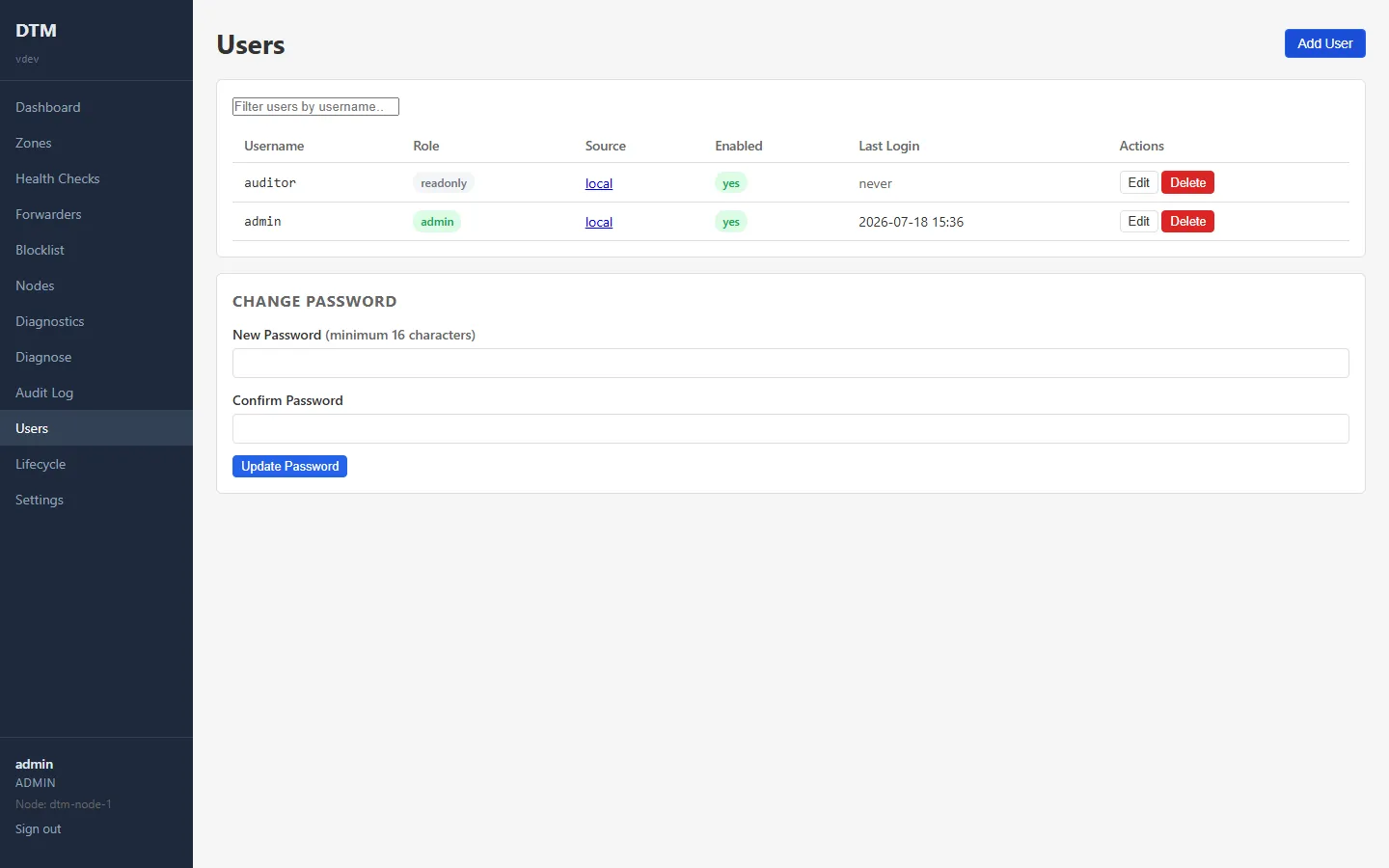
Section titled “Create and manage users”Use the Users page in the UI, or the API (admin role required):
# Create an editor user (password must be at least 16 characters)curl -sk -X POST https://dtm.internal:8443/api/v1/users \  -H "Authorization: Bearer $DTM_TOKEN" \  -H "X-DTM-CSRF: 1" \  -H "Content-Type: application/json" \  -d '{"username": "alice", "password": "long-enough-password-1234", "role": "editor"}'
# Change a user's role, enable/disable, or reset passwordcurl -sk -X PUT https://dtm.internal:8443/api/v1/users/<id> \  -H "Authorization: Bearer $DTM_TOKEN" \  -H "X-DTM-CSRF: 1" \  -H "Content-Type: application/json" \  -d '{"role": "readonly", "enabled": true}'
Passwords must be at least 16 characters. Disabling a user ("enabled": false)
blocks sign-in without deleting the account.
Two server-side guards keep an organisation from locking itself out, enforced on the API and reflected in the UI:
- You cannot delete or disable your own account (
400); have another admin do it. The UI simply omits Delete on your own row. - The last enabled admin cannot be deleted, disabled, or demoted. The guard counts only enabled admins, so you cannot disable your way to zero either. Add a second admin first.
Teams that manage DTM as code
can declare users with the dtm_user Terraform resource instead, with a
write-only password that never enters state; see
users and SSO as code.
Tokens
Section titled “Tokens”The API and Terraform authenticate with a JWT bearer token from
POST /api/v1/auth/login. Tokens are valid for 24 hours; refresh them in
long-running automation. See the API overview.
Single sign-on
Section titled “Single sign-on”For centrally-managed identities, configure Entra ID single sign-on. With SSO, users sign in with their Microsoft account and their DTM role is derived from an app role you assign in Entra.
Auditing
Section titled “Auditing”Every change is recorded in the audit log, queryable from the Audit Log page or
GET /api/v1/audit (readable by editor and admin). Filter by user, resource,
action, or a date range (From / Until in the UI; from / to on the
API) to review who changed what; the NDJSON export honours the same filters.
Audit log retention
Section titled “Audit log retention”The stored audit log is bounded, not permanent: by default it keeps at most 10,000 entries, pruning oldest-first, and it has no time limit. Two server-configuration settings control the window:
observability: audit_max_entries: 10000 # count cap; oldest entries dropped first (minimum 1000) audit_retention: '2160h' # optional time cap (Go duration, here 90 days); unset by default, so no time limitThese are per-node configuration settings, read from each node’s configuration file. A backup holds the whole database, the audit log included, so a larger window makes backups larger too.
Change it without a restart. Added in v1.0.7. The Audit Log
Retention card on the Settings page, or PUT /api/v1/config/audit-retention
(admin only), sets the age limit for the whole cluster. It applies at the next
hourly clean-up, with no restart:
curl -sk -X PUT https://<node>:8443/api/v1/config/audit-retention \ -H "Authorization: Bearer $DTM_TOKEN" \ -H "X-DTM-CSRF: 1" \ -H "Content-Type: application/json" \ -d '{"retention": "4320h"}'- Range: seven days to ten years, as a Go duration.
audit_retentionin the configuration file takes the same range; a value outside it is refused at start, with a log line, and the 90-day default applies. - The file is the floor. A saved value can lengthen the limit set by
audit_retentionin a node’s configuration file, never shorten it below that. To go shorter, edit the file and restart. With nothing saved, the file applies. - A shorter limit removes entries. Entries older than the new limit go at the next clean-up, so the console asks for confirmation before it saves one. Every change is recorded in the audit log with its before and after.
- During a rolling upgrade, a node not yet on v1.0.7 keeps its own limit until it is upgraded.
If your compliance regime needs a defined retention (SOC 2, PCI, internal IR
policy), set audit_retention to it and alert when the log approaches its cap:
the dtm_audit_entries metric is the live count, so alerting when it exceeds
90% of audit_max_entries gives warning before pruning clips evidence. For
retention beyond the stored window, schedule GET /api/v1/audit/export
(NDJSON, filterable, same editor/admin readability) to immutable storage;
see the audit log API.
With Entra ID SSO enabled, Entra sign-ins appear here as
their own accounts (usernames prefixed entra:, no local password), fully
separate from local accounts even when the names look alike; see
how SSO and local accounts coexist.