
Azure DNS Private Resolver coexistence
Azure DNS Private Resolver and Hayami DTM do different jobs, and many environments run both. The resolver is a managed forwarding bridge: inbound endpoints let on-prem clients resolve into Azure, and outbound endpoints with forwarding rulesets send chosen domains from your VNets to other DNS servers. DTM is an authoritative server: it owns zones, health-checks the backends behind every answer, and load-balances across them.
The short version: the resolver moves queries between networks; DTM decides what the answer is. This page shows the three wiring patterns that come up, how to pick one, and the loops to avoid.
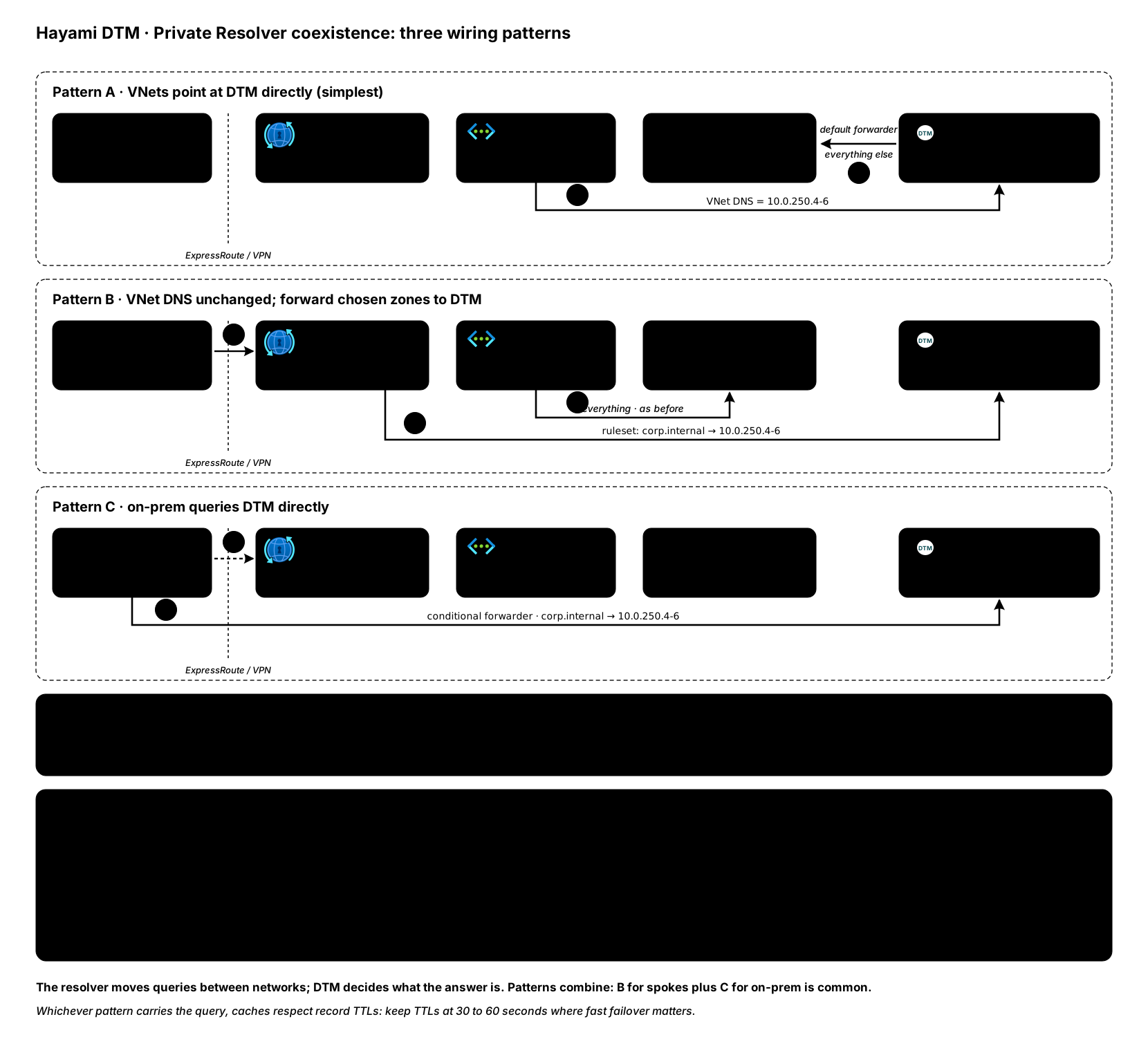
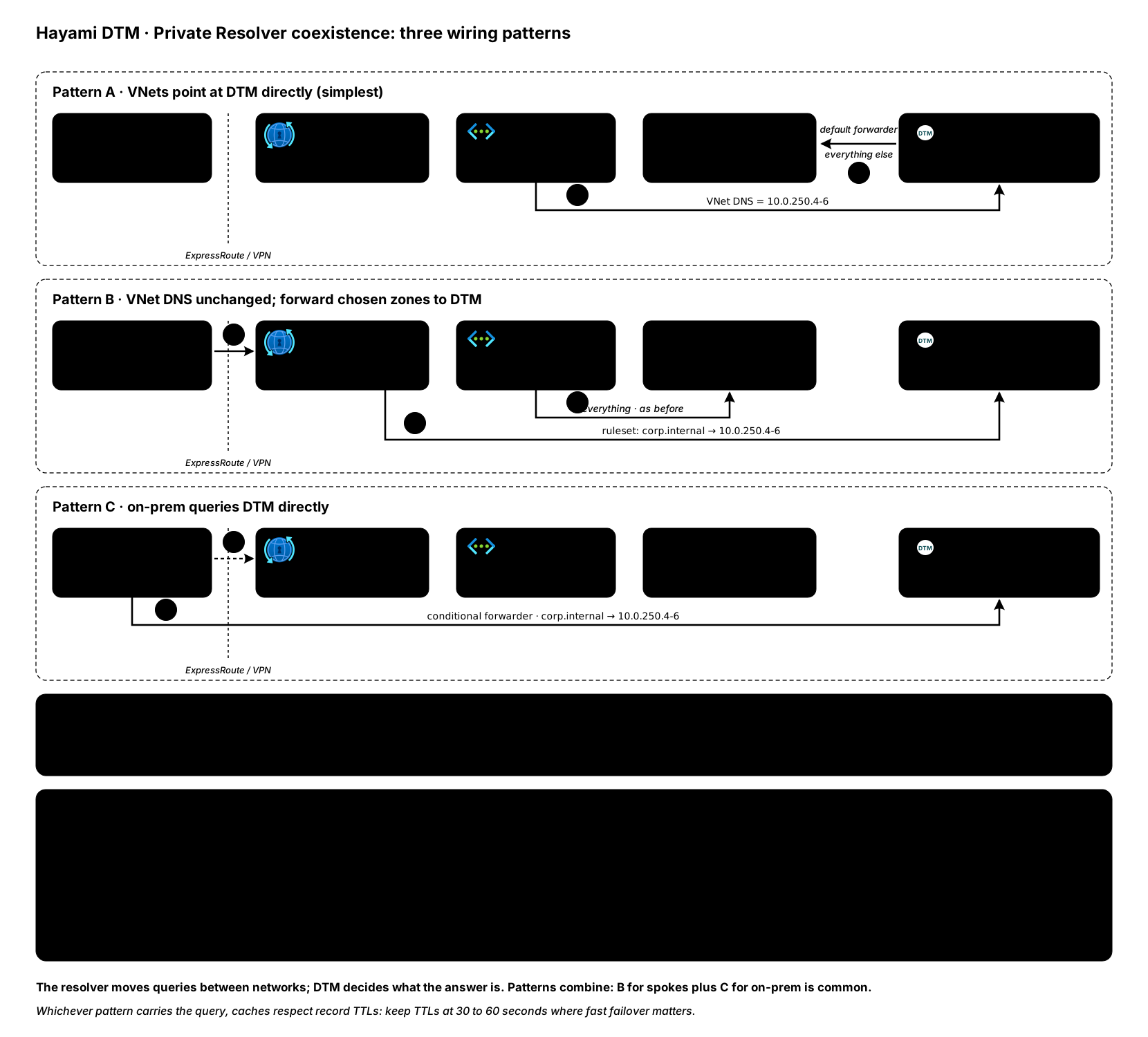
Pattern A: VNets point at DTM directly (simplest)
Section titled “Pattern A: VNets point at DTM directly (simplest)”Set the VNet DNS servers to the DTM node IPs. DTM answers its own zones with health-checked answers, and its default forwarder sends everything else to Azure-provided DNS, so Private Endpoint zones and public names keep resolving exactly as before:
curl -sk -X PUT "https://10.0.250.4:8443/api/v1/forwarders/default" \ -H "Authorization: Bearer $DTM_TOKEN" -H "X-DTM-CSRF: 1" \ -H "Content-Type: application/json" \ -d '{ "upstreams": ["168.63.129.16"], "enabled": true }'No resolver is required for this pattern: DTM nodes sit inside the VNet, so
168.63.129.16 (Azure-provided DNS) is reachable and still consults the
private DNS zones linked to that VNet.
Fits when: you are adopting DTM as the resolution path for your VNets and can change VNet DNS settings.
Pattern B: keep VNet DNS as-is, forward chosen zones to DTM
Section titled “Pattern B: keep VNet DNS as-is, forward chosen zones to DTM”If repointing VNet DNS settings is not on the table yet, leave the VNets on Azure-provided DNS and use a resolver forwarding ruleset to send only the zones DTM owns to the DTM nodes:
az dns-resolver forwarding-rule create \ --ruleset-name corp-rules -g rg-dns \ --name corp-internal --domain-name "corp.internal." \ --forwarding-rule-state Enabled \ --target-dns-servers '[{"ip-address":"10.0.250.4","port":53},{"ip-address":"10.0.250.5","port":53},{"ip-address":"10.0.250.6","port":53}]'Every VNet linked to that ruleset resolves corp.internal through DTM
(health-checked answers included) while everything else stays on its current
path. On-prem clients querying through an inbound endpoint get the same
behavior, because the inbound endpoint resolves with the ruleset applied.
Fits when: you want DTM’s answers without touching VNet DNS settings, or you are adopting DTM zone by zone.
Pattern C: on-prem clients query DTM directly
Section titled “Pattern C: on-prem clients query DTM directly”DTM nodes are ordinary private IPs, so on-prem DNS servers can conditionally
forward corp.internal straight to the node IPs over ExpressRoute or VPN,
skipping the inbound endpoint for those zones. Windows DNS example:
Add-DnsServerConditionalForwarderZone -Name "corp.internal" ` -MasterServers 10.0.250.4, 10.0.250.5, 10.0.250.6Fits when: on-prem resolution of DTM zones matters and you want one hop fewer in the path. Keep the resolver’s inbound endpoint for everything else it already handles.
Choosing a pattern
Section titled “Choosing a pattern”| You want | Pattern |
|---|---|
| DTM as the VNet resolution path, fewest moving parts | A |
| DTM answers without changing VNet DNS settings | B |
| Zone-by-zone adoption with easy rollback | B (remove the rule to roll back) |
| On-prem resolution of DTM zones, shortest path | C |
| On-prem resolution of Private Endpoint zones | Inbound endpoint (resolver’s job, keep it) |
Patterns combine: B for spokes plus C for on-prem is common.
Avoid these loops
Section titled “Avoid these loops”- Do not create a forwarding rule for a zone and simultaneously configure DTM to forward that same zone back to Azure-provided DNS: the query loops. A zone DTM owns authoritatively never forwards, so this only arises with conditional forwarders whose domain overlaps a ruleset rule.
- Do not point DTM’s default forwarder at an inbound endpoint that resolves
through a ruleset targeting DTM. Point the default forwarder at
168.63.129.16(pattern A) and let the resolver target DTM, not the other way around at the same time.
TTLs and caching
Section titled “TTLs and caching”Both Azure-provided DNS and the resolver cache answers up to the record TTL. DTM’s health-gated failover takes effect when caches expire, so keep TTLs low (30 to 60 seconds) on names where fast failover matters, whichever pattern carries the query. See health checks.
Need a hand? Email [email protected].
Last validated: 2026-08-06